Architecture Details
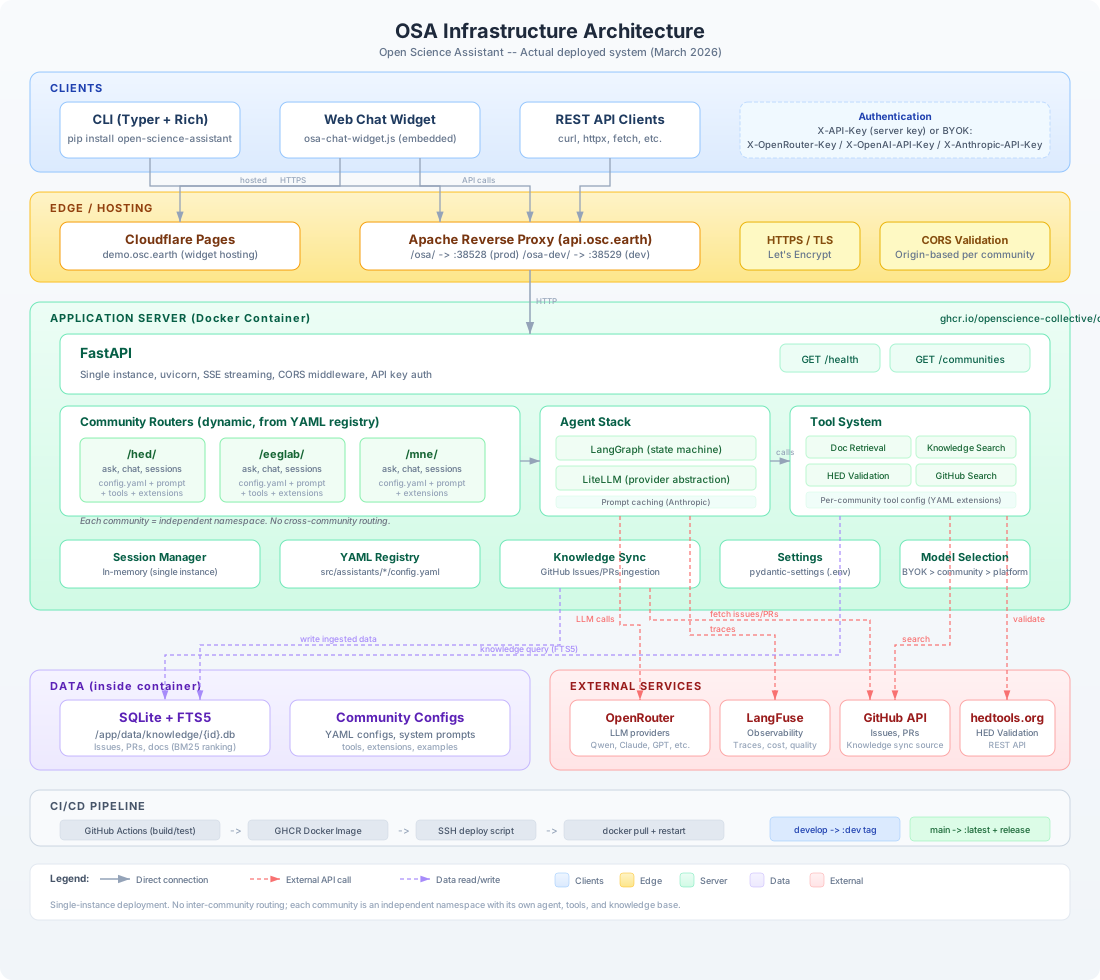
This page shows the internal structure of the OSA platform, including all components, data flows, and external service connections.
Request Flow
A typical request flows through the system as follows:
- Client (CLI, widget, or API consumer) sends an HTTPS request to
api.osc.earth - Apache reverse proxy strips the
/osa/prefix and forwards to the Docker container - FastAPI validates authentication (API key or BYOK headers) and CORS origin
- Community router (e.g.,
/hed/ask) handles the request using the community's configuration - LangGraph agent runs the conversation loop:
- Sends messages to the LLM via LiteLLM (through OpenRouter)
- LLM may request tool calls (document retrieval, knowledge search, validation)
- Tools query SQLite + FTS5 databases or external APIs (GitHub, hedtools.org)
- Loop continues until the agent produces a final response
- Response is streamed back to the client via SSE (Server-Sent Events)
- LangFuse records the trace for observability
Community Routing
Routes are created dynamically at startup from the YAML registry:
# src/api/main.py - simplified
for community in registry.list_available():
    router = create_community_router(community.id)
    app.include_router(router)  # Creates /{community_id}/ask, /chat, etc.
Each community gets four endpoints:
| Endpoint | Method | Purpose |
|---|---|---|
/{id}/ | GET | Community configuration (public) |
/{id}/ask | POST | Single question (no history) |
/{id}/chat | POST | Multi-turn conversation with session |
/{id}/sessions | GET | List active sessions |
Model Selection
Model selection follows a priority chain:
User requests custom model (requires BYOK)
    |
    v  (no custom model)
Community default_model (from config.yaml)
    |
    v  (no community override)
Platform default_model (from settings)
This allows communities to choose their preferred model while giving users with BYOK the freedom to use any model.
Knowledge System
Each community has its own SQLite database with FTS5 full-text search:
/app/data/knowledge/
    hed.db       - HED issues, PRs, documentation
    eeglab.db    - EEGLAB issues, PRs, documentation
    mne.db       - MNE issues, PRs, documentation
Knowledge is synced from GitHub via the osa sync CLI command, which fetches issues and PRs and indexes them for full-text search with BM25 ranking.
Why SQLite + FTS5?
For single-instance lab deployment, SQLite with FTS5 is the optimal choice:
| Approach | Search Speed | Dependencies | Use Case |
|---|---|---|---|
| JSON files | O(n) linear | None | Tiny datasets (<1K) |
| SQLite + FTS5 | O(log n) indexed | None (stdlib) | Single instance, 10K-1M records |
| PostgreSQL | O(log n) indexed | External server | Multi-instance |
Advantages: no external server, BM25 ranking, 100-1000x faster than linear scan, Python stdlib, easy backup (copy the file).
Security Layers
| Layer | Protects Against | Location |
|---|---|---|
| HTTPS / TLS | Man-in-the-middle | Let's Encrypt via Apache |
| API Key auth | Unauthorized access | FastAPI middleware |
| CORS validation | Cross-origin attacks | FastAPI middleware (per-community origins) |
| BYOK isolation | Key exposure | Keys forwarded, never stored |
CI/CD Pipeline
GitHub Actions (build/test)
    -> GHCR Docker Image (:dev or :latest)
    -> SSH deploy script
    -> docker pull + restart on lab server
| Branch | Docker Tag | Deployment |
|---|---|---|
develop | :dev | api.osc.earth/osa-dev (port 38529) |
main | :latest + GitHub Release | api.osc.earth/osa (port 38528) |