Architecture Overview
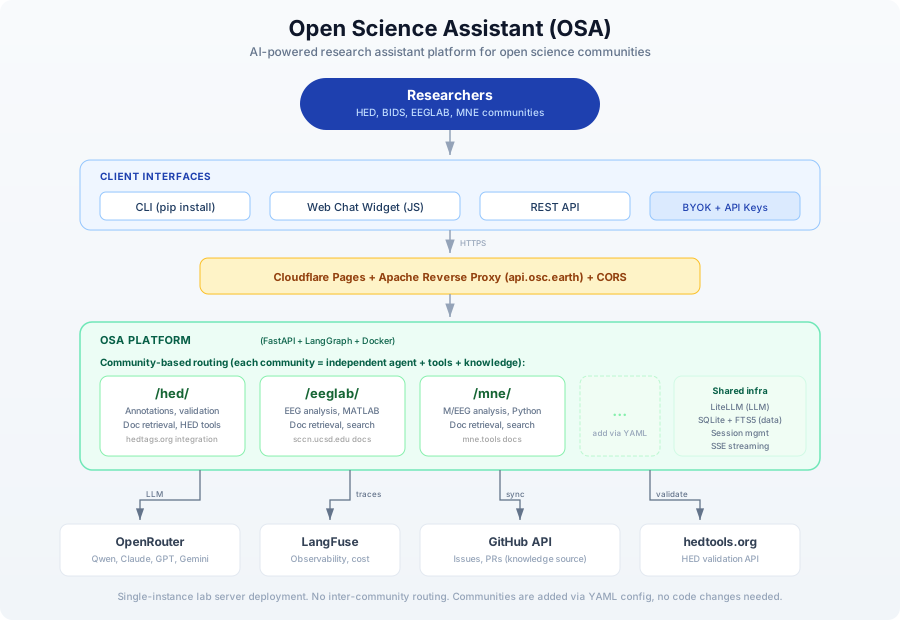
OSA is a single-instance AI assistant platform that serves multiple research communities from one deployment. Each community gets its own independent namespace with a dedicated agent, tools, and knowledge base.
Key Design Decisions
Community-based routing, not a supervisor agent
Each community (HED, EEGLAB, MNE, etc.) is an independent namespace at the API level:
/hed/ask       - Ask the HED assistant
/eeglab/chat   - Chat with the EEGLAB assistant
/mne/ask       - Ask the MNE assistant
There is no router or supervisor agent that dispatches queries between communities. The user (or widget) selects a community explicitly, and each community has its own:
- System prompt tailored to the domain
- Tools configured via YAML extensions
- Knowledge base (SQLite + FTS5, synced from GitHub)
- LangGraph agent running the conversation loop
Simple infrastructure
OSA targets small research communities running on lab servers, not large-scale cloud deployments:
| Choice | Why |
|---|---|
| Single FastAPI instance | No need for horizontal scaling |
| SQLite + FTS5 | No external database server needed; full-text search with BM25 ranking |
| In-memory sessions | Single instance means no shared state needed |
| Docker | Reproducible deployment, easy updates |
| OpenRouter | Single API for multiple LLM providers (Qwen, Claude, GPT, etc.) |
Adding a community requires no code changes
Communities are defined entirely in YAML configuration files. Adding a new community means creating a config.yaml with the community's identity, system prompt, tools, and knowledge sources. The API routes are generated dynamically at startup.
See the Community Registry documentation for details.
Component Summary
| Component | Technology | Purpose |
|---|---|---|
| API Server | FastAPI | REST API, SSE streaming |
| CLI | Typer + Rich | Command-line interface (pip install open-science-assistant) |
| Agent Orchestration | LangGraph | State machine for conversation + tool-calling loop |
| LLM Abstraction | LiteLLM | Provider routing, prompt caching |
| Knowledge Storage | SQLite + FTS5 | Issues, PRs, docs with full-text search (BM25) |
| Observability | LangFuse | Tracing, cost tracking, quality metrics |
| Deployment | Docker + GitHub Actions | CI/CD to GHCR, deploy via SSH |
| Frontend | Cloudflare Pages | Widget hosting (demo.osc.earth) |
| Reverse Proxy | Apache | api.osc.earth path-based routing |
External API Integrations
OSA integrates with existing validator and tool APIs rather than hosting validation engines locally:
| Service | Integration |
|---|---|
| HED Validation | String, sidecar, spreadsheet, BIDS validation |
| OpenRouter | LLM provider routing (Qwen, Claude, GPT, Gemini) |
| GitHub API | Knowledge source (issues, PRs) |
| LangFuse | Observability and cost tracking |
Authentication
OSA supports two authentication modes:
- Server API key (
X-API-Keyheader): Uses the server's configured LLM key with the community's default model - BYOK (Bring Your Own Key): Users provide their own OpenRouter/OpenAI/Anthropic key via headers, allowing them to use any model
Deployment
OSA runs as a Docker container behind an Apache reverse proxy:
| Environment | API URL | Frontend URL |
|---|---|---|
| Production | https://api.osc.earth/osa | https://demo.osc.earth |
| Development | https://api.osc.earth/osa-dev | https://develop-demo.osc.earth |
CI/CD: GitHub Actions builds Docker images on push, tagged :dev (develop branch) or :latest (main branch). Deployment is a docker pull + restart on the lab server.
For the detailed internal architecture, see Architecture Details.